Best AI Chatbots 2027: 10 Compared (Free and Paid)
Ten different chatbots all promise to be your new favorite assistant, and every one of them has a free plan. Which do you open first? Pick wrong and you lose an afternoon learning a tool that does not fit how you work.
This guide compares 10 AI chatbots and assistants: ChatGPT, Claude, Google Gemini, Perplexity, Microsoft Copilot, DeepSeek, Poe, Meta AI, Pi and Character.AI. For each, you get what it does well, what it costs, and what to watch out for. By the end you should know which two or three to try first.
How we made this list: We compared these tools using each company's official pricing and product pages and recent public reporting. We did not run our own hands-on tests, and there are no scores here. No tool paid to be included. Plans and prices change often, so confirm on the official page before you pay. Prices were checked on 15 November 2026.
What are the best AI chatbots? (Quick answer)
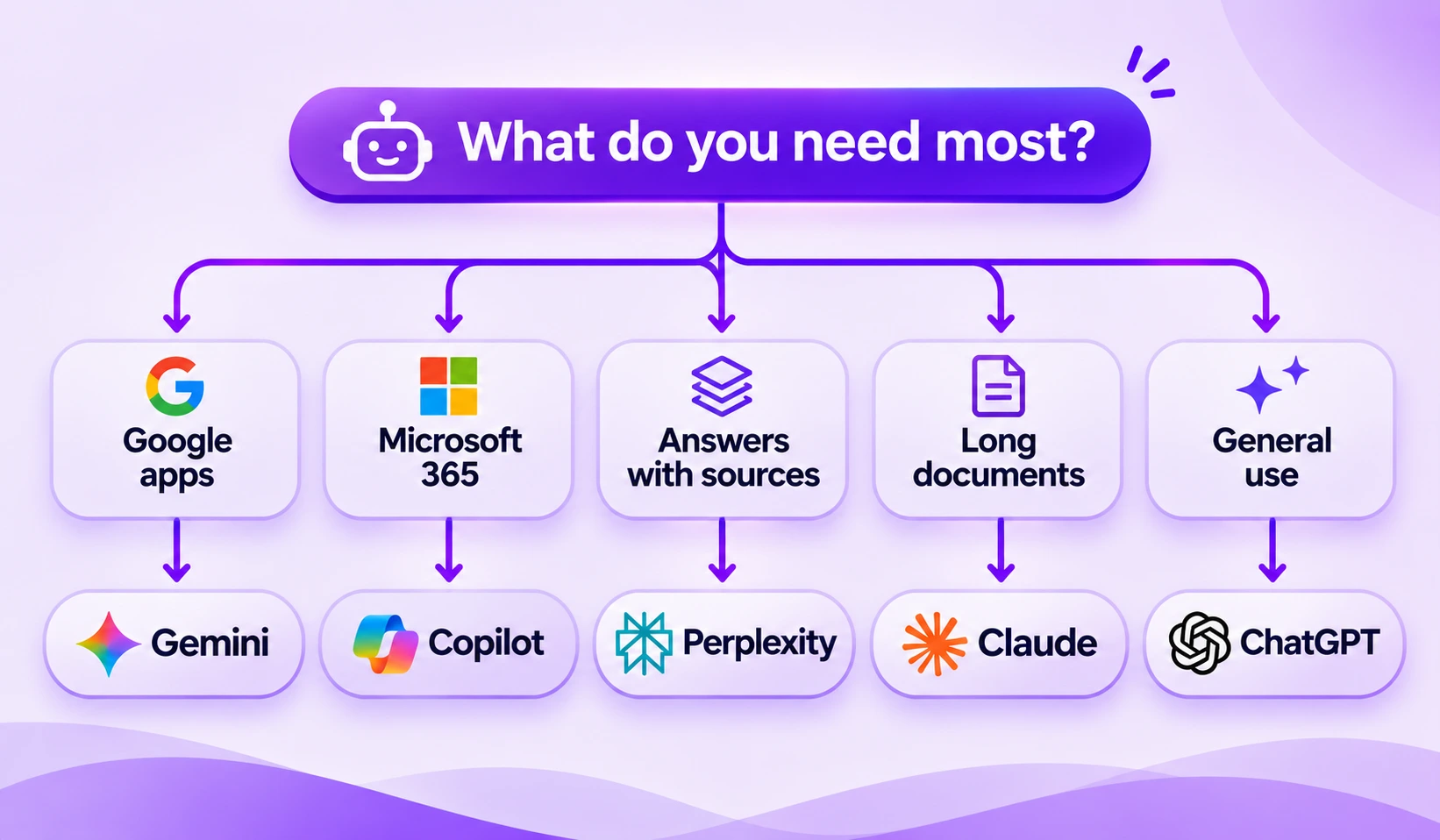
There is no single best chatbot, so start with the tools you already use. ChatGPT is a broad all-rounder. Claude suits long documents and careful writing. Google Gemini fits Google app users, and Microsoft Copilot fits Microsoft 365 teams. For answers with visible sources, try Perplexity. Most have a free plan, so test two or three before paying.
This guide is part of our Chatbots & Virtual Assistants category, where you can browse more tools in this space.

What is an AI chatbot or assistant?
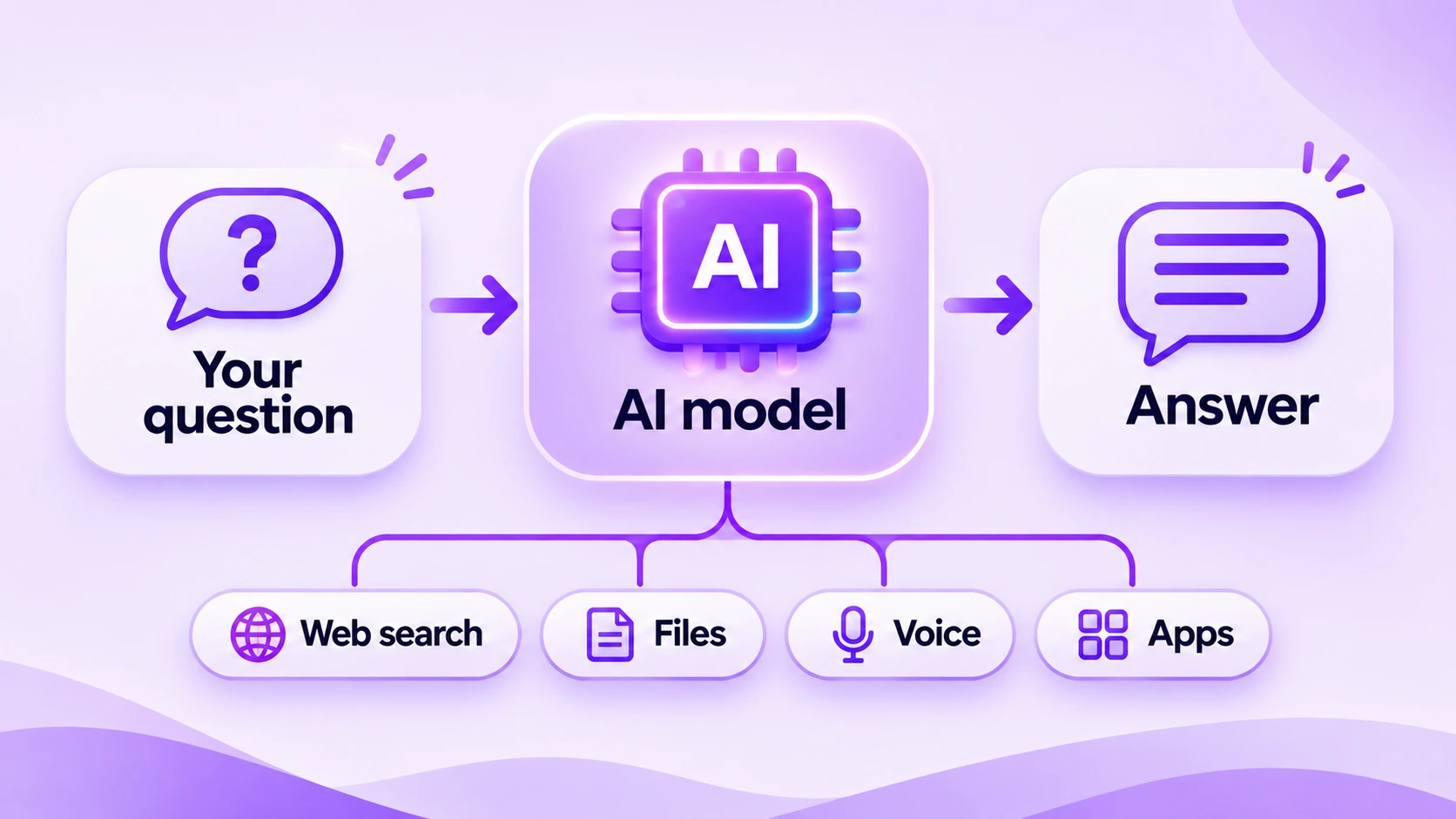
An AI chatbot is a conversational tool built on a large language model (LLM). You type or speak a question, and it replies, drafts text, summarizes a document or explains a topic. An "assistant" usually goes a step further: it can search the web, read files, hold a voice chat or work inside other apps.
If words like token, context window or hallucination are new to you, our guide to AI and ML terms explained covers them in plain English. For the bigger picture, browse our AI concepts library.
The 10 tools at a glance
| Tool | Best for | Free plan | Paid plans (from, USD per month) |
|---|---|---|---|
| ChatGPT | Everyday all-round use | Yes (may show ads) | Go $8, Plus $20, Pro $100 or $200 |
| Claude | Long documents, writing | Yes | Pro $20 ($17 billed yearly), Max from $100 |
| Google Gemini | Google app users | Yes | Google AI Pro $19.99, AI Ultra from $99.99 |
| Perplexity | Answers with sources | Yes | Pro $20, Max $200, Education Pro $10 |
| Microsoft Copilot | Microsoft 365 users | Yes | Inside Microsoft 365 plans; work version about $30 per user |
| DeepSeek | Free chat on non-private topics | Yes | No paid chat plan found |
| Poe | Trying many models in one app | Yes (limited daily points) | Points-based, Premium $19.99 |
| Meta AI | Quick chat inside Meta apps | Yes | No paid plan found |
| Pi | Friendly conversation | Yes | No paid plan found |
| Character.AI | Characters and roleplay (18+) | Yes | c.ai+ about $9.99 (varies by country) |
Local prices and taxes differ, and companies change plan names and limits often. Treat this table as a starting point and check each official pricing page.
How to choose the right chatbot
- Start with your existing apps. Google users often begin with Gemini, and Microsoft 365 users with Copilot.
- Decide if you need sources. For research, pick a tool that shows its citations.
- Set a budget. Most paid plans start around $20 a month, and the free plans are enough to try.
- Check privacy. Look at where data is stored and whether you can stop chats being used to train models.
- Match the job. Some tools are built for documents, others for casual chat or characters.
The 10 tools in detail
These are in no particular order. Each entry covers what the tool is, what it costs and what to keep in mind.
1. ChatGPT
Price: Free (may show ads), Go from $8, Plus $20, Pro $100 or $200 per month.
ChatGPT, from OpenAI, is one of the most widely used assistants. It covers everyday questions, writing, coding help, image creation and voice chat, and paid plans add features such as projects and custom GPTs. See it in our ChatGPT listing or on the official pricing page.
- Good for: a wide feature set in one app, on web, desktop and mobile.
- Keep in mind: the free plan has message limits, and plans and models change often. Review the data controls in Settings before sharing private text.
2. Claude
Price: Free, Pro $20 ($17 billed yearly), Max from $100 per month, plus Team and Enterprise plans.
Claude, from Anthropic, is known for handling long documents and for a careful, less padded writing style. Paid plans raise usage limits and add tools such as projects. See our Claude listing and the official pricing page.
- Good for: summarizing long reports, drafting and editing text.
- Keep in mind: usage limits apply on every plan and reset in time windows.
3. Google Gemini
Price: Free, Google AI Pro $19.99, Google AI Ultra from $99.99 per month.
Gemini is Google's assistant. Its biggest advantage is where it lives: in the Gemini app and, on paid plans, inside Gmail, Docs and other Google apps. It can also work with images and use Google Search for current information. See our Gemini listing and Google's plans page.
- Good for: people who already work in Google apps, and questions that involve images or current information.
- Keep in mind: Google changed plan names and limits several times in 2026. The older "Google One AI Premium" plan is now called Google AI Pro.
Choosing between the two biggest names? Read our ChatGPT vs Gemini comparison.
4. Perplexity
Price: Free, Pro $20, Max $200, Education Pro $10 per month.
Perplexity works more like an answer engine than an open-ended chat. It searches the web and returns an answer with numbered sources you can open. See our Perplexity listing or the official site. For more research-focused tools, browse our Research & Education category.
- Good for: research, current events and checking where a claim came from. Verified students and educators get a discounted plan.
- Keep in mind: it is built around search, so it suits long creative drafting less. Answers are only as good as the pages it finds, so open the sources.
5. Microsoft Copilot
Price: Free app and website, paid features inside Microsoft 365 plans, and Microsoft 365 Copilot for work at about $30 per user per month (list price).
Microsoft Copilot has a free app and website for general questions, and a paid version built into Word, Excel, PowerPoint, Outlook and Teams. See our Copilot listing and the official site.
- Good for: people and teams already on Microsoft 365, drafting and summarizing inside Office apps.
- Keep in mind: "Copilot" names several products. The free app, Microsoft 365 Copilot for work and GitHub Copilot for coding are different things with different prices.
6. DeepSeek
Price: Free chat on web and mobile apps. Developers can use its models through a separately priced API.
DeepSeek is a Chinese AI company whose chat app is free and has drawn attention for strong reasoning and coding results at low cost. See our DeepSeek listing.
- Good for: free chat and reasoning or coding questions that are not sensitive.
- Keep in mind: DeepSeek's privacy policy says personal data, including prompts and chat history, is stored on servers in China. Do not paste private, confidential or customer data, and businesses should read the policy first.
7. Poe
Price: Free with limited daily points, and points-based paid plans (Premium $19.99 per month).
Poe, from Quora, is a front door to many AI models. Instead of one assistant, you pick from models by several companies, plus bots made by other users, inside one app. Check the current plans page.
- Good for: trying several models without separate accounts, and comparing answers to the same question.
- Keep in mind: every message spends points, bigger models cost more, and the allowances changed during 2026.
8. Meta AI
Price: Free.
Meta AI is Meta's assistant. You can use it inside WhatsApp, Instagram, Facebook and Messenger, and in its own app and website at meta.ai. It is aimed at everyday questions, image creation and voice chat.
- Good for: quick questions without leaving apps you already use.
- Keep in mind: it is tied to your Meta accounts and privacy settings, and it has fewer work-document tools than the others here. The app has a feed of prompts users choose to share, so check what you share.
9. Pi
Price: Free.
Pi, from Inflection AI, is built around a warm, conversational style. It is meant for talking things through rather than getting work done, and it is available on the web at pi.ai and in mobile apps.
- Good for: relaxed back-and-forth conversation and informal voice chats.
- Keep in mind: it is not built for long documents, coding or research. Inflection shifted much of its focus to business AI after 2024, so check pi.ai for current status. It is not a substitute for professional advice.
10. Character.AI
Price: Free, c.ai+ about $9.99 per month (varies by country).
Character.AI lets you chat with, and create, AI characters, from fictional personas to user-made companions. It is aimed at entertainment and storytelling. Visit character.ai.
- Good for: adults who want creative storytelling and roleplay.
- Keep in mind: since 25 November 2025, users under 18 can no longer have open-ended chats with characters. Characters are fictional AI, so do not rely on them for medical, legal, money or crisis advice.
Which chatbot for which job?
| If you want to... | Try | Why |
|---|---|---|
| Start with one general assistant | ChatGPT | Wide feature set and many guides |
| Work through long documents or write carefully | Claude | Known for long-document handling and a careful style |
| Check where an answer came from | Perplexity | Shows numbered, clickable sources |
| Work inside Gmail and Docs | Google Gemini | Built into Google apps on paid plans |
| Work inside Word, Excel and Outlook | Microsoft Copilot | Built into Microsoft 365 |
| Compare many models in one place | Poe | One app, many models |
| Ask quick questions inside WhatsApp or Instagram | Meta AI | Lives inside Meta apps |
| Have a relaxed chat | Pi | Warm conversational style |
| Roleplay with characters (18+) | Character.AI | Built around characters |
Writing is the most common job for these tools. If that is yours, our Writing & Content category lists tools built just for it. For code, see Coding & Developer Tools, and for everyday workflows, Productivity & Automation.
Privacy and safety checklist
A chatbot is only useful if you can trust how you use it. For a more formal framework, see the NIST AI Risk Management Framework.
| Risk | What can happen | What to do |
|---|---|---|
| Wrong answers | A confident reply is made up or outdated | Verify facts, names and numbers, and open sources where offered |
| Privacy | Pasted text may be stored or used for training | Read the privacy policy, use opt-out settings, avoid confidential data |
| Data location | Some services store data in other countries | Check where data is stored, especially for DeepSeek |
| Overreliance | You stop checking the work | Keep a human in the loop for important decisions |
| Companion-style apps | Fictional characters are mistaken for real advice | Treat them as entertainment, and keep to the age rules |
Beyond chatbots: agents and connected tools
Many assistants are moving from answering questions to taking actions, such as booking meetings or updating documents. If that interests you, read our guide to AI agents vs workflow automation, and learn how assistants connect to outside apps in our guide to MCP (Model Context Protocol).
Sources
Plans and prices come from the official pages below and recent public reporting, checked on 15 November 2026.
- ChatGPT pricing (OpenAI)
- Claude pricing (Anthropic)
- Google AI plans
- Perplexity plans
- Microsoft: choosing a Copilot plan
- Poe subscription plans
- eSafety Commissioner: Character.AI guide (under-18 chat change)
- DeepSeek's privacy policy, linked from chat.deepseek.com
Frequently asked questions
What is the best AI chatbot?
It depends on what you need. ChatGPT is a common starting point because of its wide feature set. Claude suits long documents and writing, Gemini suits Google users, Copilot suits Microsoft 365 users and Perplexity suits research with sources. Try two or three free plans before you pay.
Which AI assistant is best for work?
Start with your existing software. Gemini fits teams on Google Workspace and Copilot fits teams on Microsoft 365. Claude and ChatGPT are popular for document-heavy and general work. Check each company's business plan for data controls before sharing company information.
Are free AI chatbots good enough?
Free plans from ChatGPT, Claude, Gemini, Perplexity and Copilot work for everyday questions, drafting and quick research. Paying mainly raises usage limits and unlocks stronger models, file uploads and extra tools.
Which chatbot gives the most accurate answers?
No chatbot is always right. Tools that search the web and show sources, such as Perplexity, make answers easier to check. Whichever tool you use, verify important facts, numbers and quotes yourself.
Is my data safe in an AI chatbot?
It varies by company and plan. Business plans usually offer stronger controls than free consumer plans. Read the privacy policy, look for a setting that stops chats being used for training, and avoid sharing confidential information. DeepSeek's own policy says data is stored in China.
What is the difference between a chatbot and an AI assistant?
The terms overlap. "Chatbot" usually means the chat interface itself. "Assistant" suggests the tool can also take actions, such as searching the web, reading files or working inside apps like email and calendars.
Explore more AI tools
Browse the full directory by category, or submit your own tool for manual review.
Browse chatbots Submit your AI tool