MCP Explained: How AI Finally Connects to Your Tools (2026)
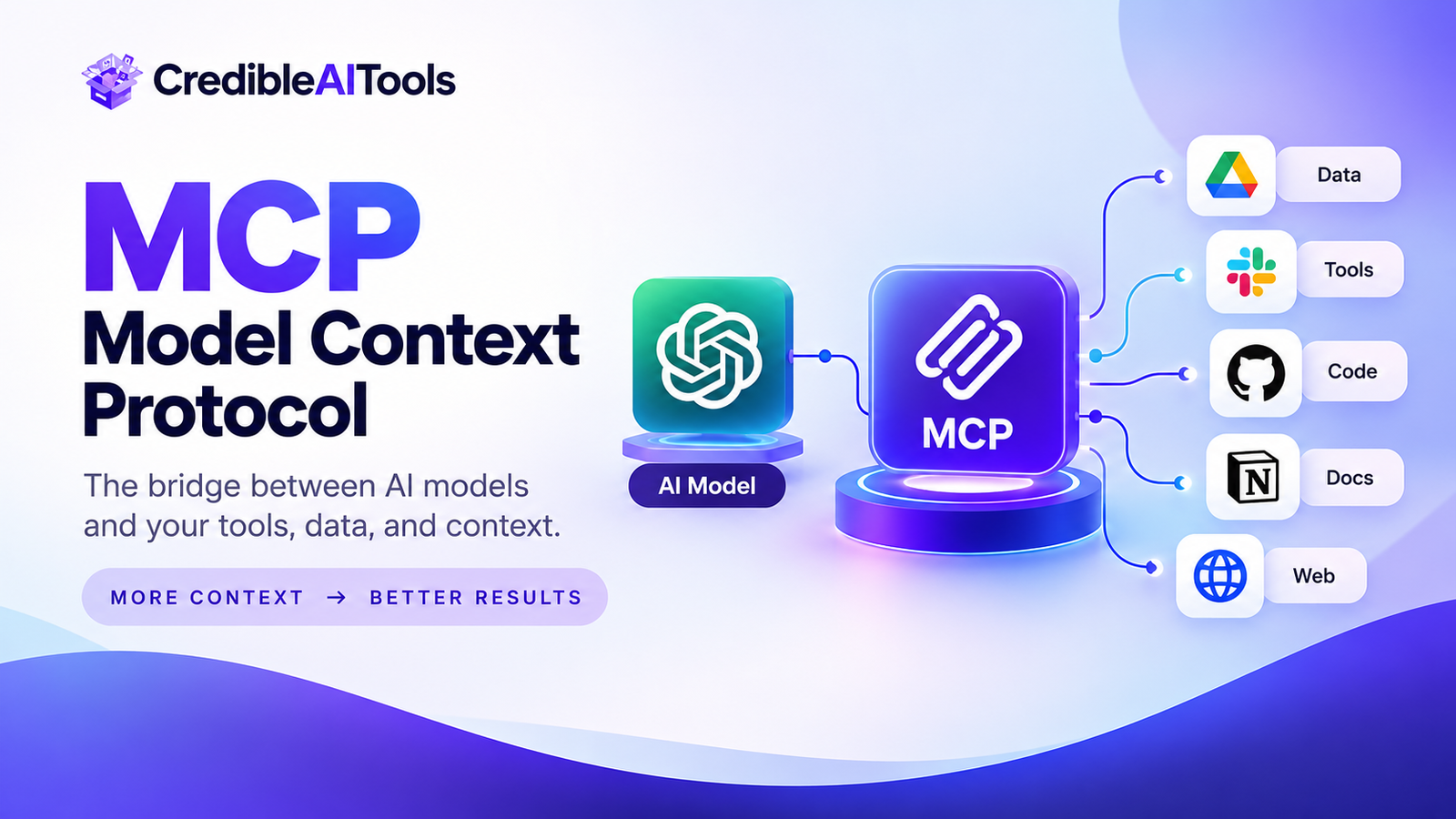
AI assistants are great at talking. They get useful when they can act: read your files, query a database, book a meeting, open a ticket. The problem is that every one of those connections used to be custom work.
MCP (Model Context Protocol) fixes that with one shared standard. This guide explains what MCP is, how its architecture works, where it helps, and where you need to be careful.
Heads up: MCP is evolving quickly. Details such as transports and authorization change between spec versions, so confirm specifics in the official MCP documentation before building.
What is MCP? (Quick answer)
MCP is an open standard that lets AI applications connect to external tools and data through one common interface. Instead of writing a separate connector for every model and every tool, you build against MCP once. Anthropic introduced it in late 2024, and many AI apps and developer tools now support it.
Think of it as a universal power adapter for AI. The plug shape is standard, so any compatible device works in any compatible socket, whatever is behind it.
The problem MCP solves
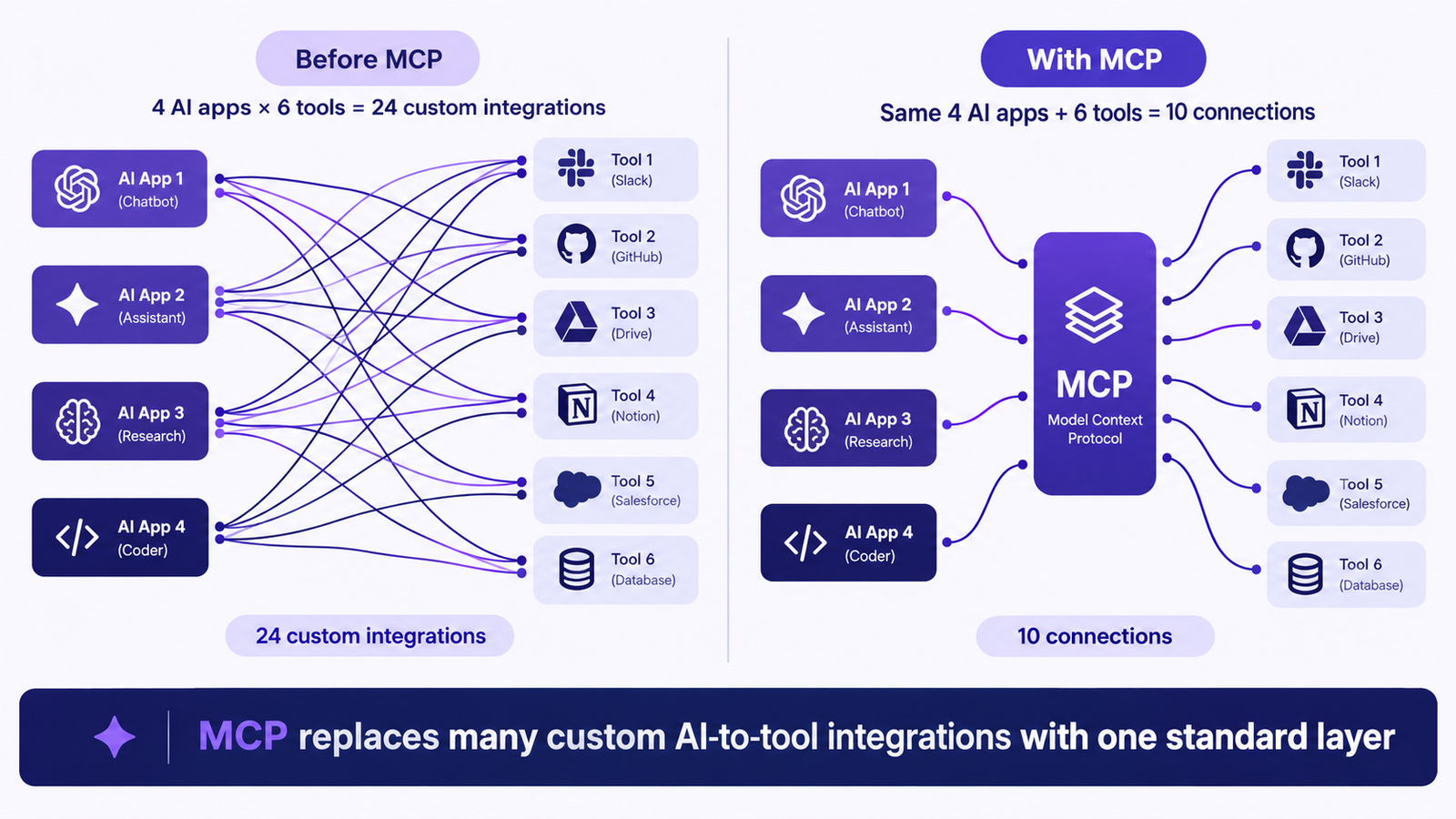
Before MCP, connecting an AI app to a tool meant custom code: learn that tool's API, format requests, parse replies, and fix it whenever the API changed. Multiply that across several models and several tools and the work explodes.
| Setup | Without MCP | With MCP |
|---|---|---|
| 4 AI apps, 6 tools | 4 × 6 = 24 custom connectors | 4 + 6 = 10 standard connections |
| Add 1 new tool | 4 new connectors | 1 new MCP server |
| Swap one AI app | Rebuild 6 connectors | Connect the new app to existing servers |
| Tool API changes | Fix every connector | Update one server |
Engineers call this the N × M problem. MCP turns it into N + M.
MCP architecture: host, client and server
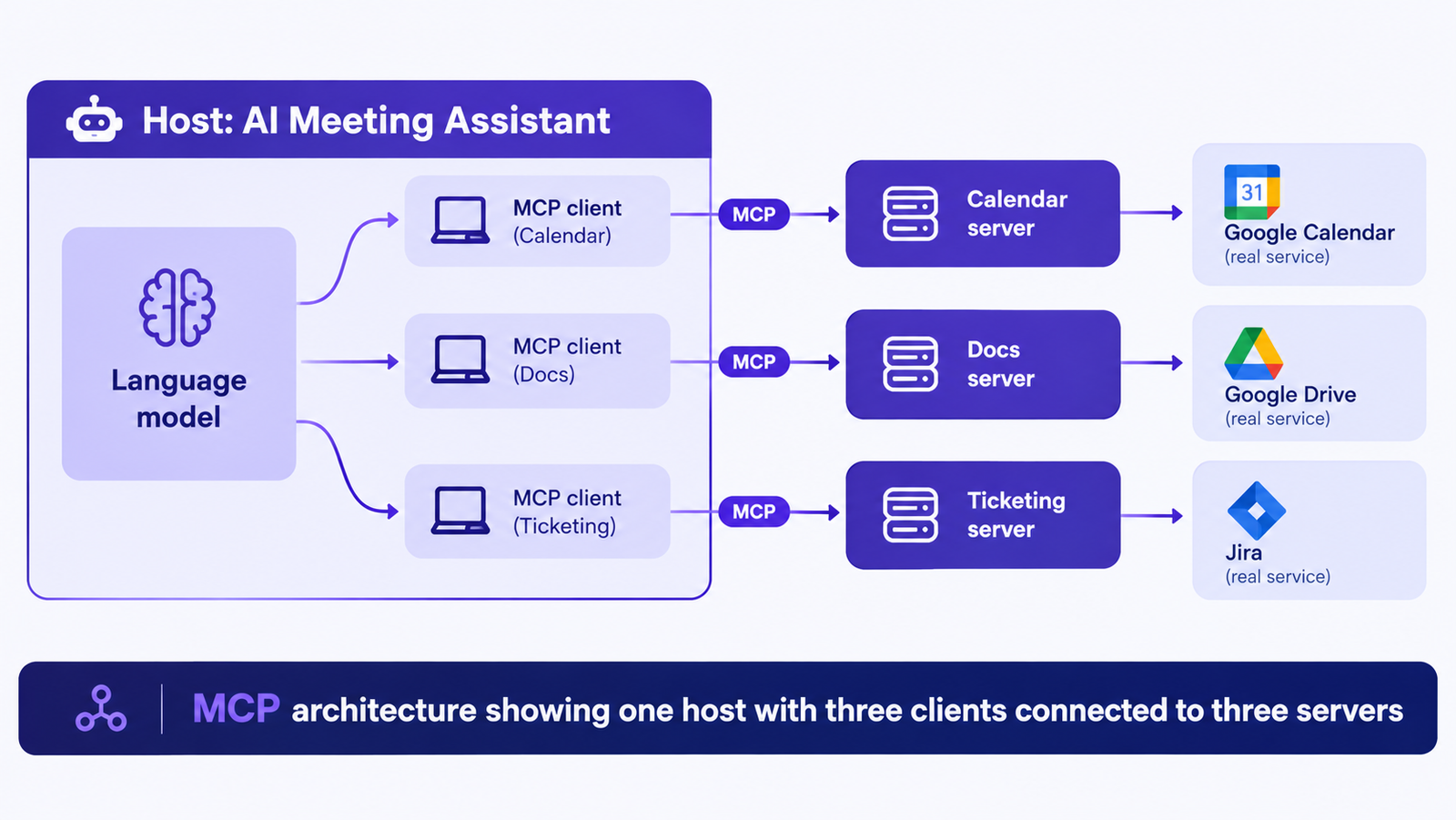
MCP has three roles. Learn these and the rest falls into place.
| Role | What it does | Real-world example |
|---|---|---|
| Host | The AI application you use. It runs the model and decides which connections to open. | A desktop AI assistant, an AI code editor, or your own agent app |
| MCP client | A component inside the host that keeps one dedicated connection to one server. | The connector that talks to your calendar server |
| MCP server | A small program that exposes a tool or data source in the MCP format. | A calendar server, a Postgres server, a file-system server |
The three building blocks servers can offer
A server can expose three kinds of capability. Most beginners only hear about tools, but the other two matter.
| Primitive | What it is | Who controls it | Example |
|---|---|---|---|
| Tools | Actions the model can request, such as running a query or sending a message | The model, with app approval | create_event |
| Resources | Read-only data the app can pull in as context | The application | A project spec file |
| Prompts | Reusable instruction templates a user can trigger | The user | "Summarize this week's tickets" |
Each tool is described with a name, a plain-language description and an input schema. The model reads those descriptions to decide what to use.
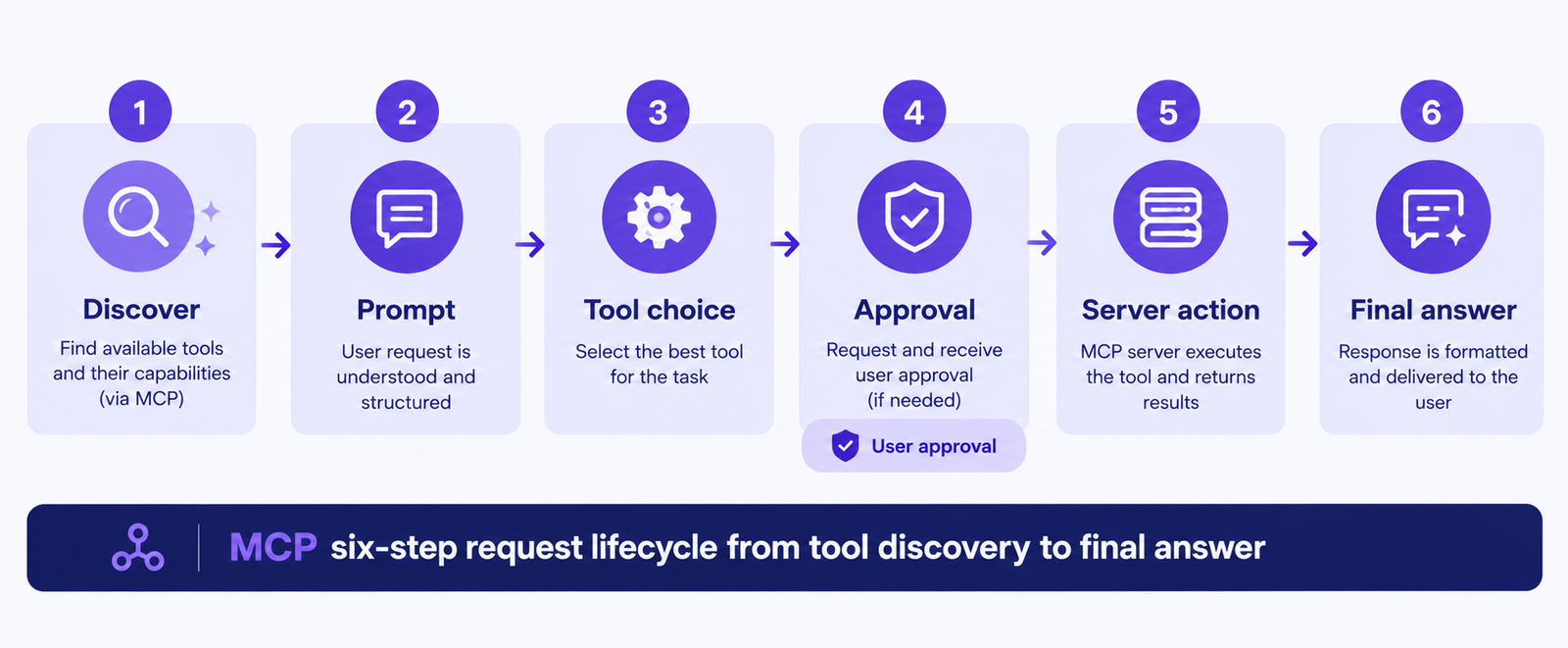
How an MCP request works, step by step
Say you tell an AI assistant: "Move my Friday design review to Monday and tell the team."
- Connect and discover. When the host starts, each client asks its server what it can do. Servers reply with their tools and schemas.
- Understand the request. The host sends your message to the model along with the tool list.
- The model picks a tool. It outputs a structured request, for example calendar update with a new date. It does not run anything itself.
- The host executes. The client forwards the call to the right server, often after asking you to approve it.
- The server acts and replies. It calls the real service and returns the result.
- The model continues. It reads the result, may call another tool (such as messaging), then writes the final answer.
How MCP connects: transports
MCP messages use JSON-RPC 2.0. The spec defines how they travel.
| Transport | Where the server runs | Best for |
|---|---|---|
| stdio | On your own machine, started by the host | Local files, local scripts, personal tools |
| Streamable HTTP | Remote, over the network | Shared team servers, cloud services, many users |
Key benefits of MCP
- Build once, reuse everywhere. One server works with any MCP-compatible app.
- Lower maintenance. API changes are fixed inside the server, not across your whole stack.
- Runtime discovery. Apps learn available tools when they connect instead of hard-coding them.
- Less vendor lock-in. Switching models does not mean rewriting integrations.
- Better credential handling. Secrets can stay in the server instead of inside prompts.
What MCP does not do: it does not give a tool new powers. A server can only do what the underlying API and its permissions allow.
MCP risks and security checklist
Connecting AI to real systems is powerful, and that makes mistakes costly. Treat every server like software you are giving access to your accounts.
| Risk | What can happen | What to do |
|---|---|---|
| Untrusted servers | A malicious server can steal data or run harmful actions | Install only from sources you trust and review the code |
| Prompt injection | Text inside a document or web page tricks the model into misusing a tool | Require approval for sensitive actions |
| Over-broad permissions | A token with full access causes full-access mistakes | Use least-privilege, read-only credentials first |
| Misleading tool descriptions | A tool claims to do one thing and does another | Audit descriptions and log every tool call |
MCP vs REST API vs function calling
| REST API | Function calling | MCP | |
|---|---|---|---|
| Built for | Developers writing code | One model's tool use | Any AI app and any tool |
| Discovery | Read docs manually | You define functions per app | Server advertises tools automatically |
| Portability | Per integration | Often tied to one provider's format | Shared standard |
| Relationship | The underlying service | The model's way to request a call | Standard layer between the two |
They are not rivals. An MCP server usually wraps a REST API, and function calling is often how a model asks the host to use an MCP tool.
Where to find or build MCP servers
| Option | Good for | Watch out for |
|---|---|---|
| Official vendor servers | Reliability and current APIs | Not every tool has one |
| Community open source | Fast start, many niches | Quality varies, so review before use |
| Build your own | Internal systems and custom logic | You maintain it |
Is MCP right for you?
- Use MCP if: you connect AI to several tools, expect to switch models, or want reusable integrations.
- Skip it if: you have one simple call to one API and no plans to grow. Plain function calling is enough.
How to get started in 5 steps
- Pick an MCP-compatible host, such as Claude or an AI code editor.
- Start with one low-risk server, like a read-only file or docs server.
- Give it minimal permissions and test with harmless tasks.
- Watch the tool calls the host shows you before approving them.
- Add more servers or build your own using the official SDKs once the basics click.
Frequently asked questions
What does MCP stand for?
MCP stands for Model Context Protocol. It is an open standard for connecting AI applications to tools and data.
Who created MCP?
Anthropic introduced MCP in November 2024 as an open standard, and many other AI companies and tools have since adopted it.
Is MCP only for Claude?
No. It is an open protocol. Any AI app can implement an MCP client, and any developer can write a server.
Is MCP the same as an API?
No. An API is how a service exposes features. MCP is a standard way for AI apps to discover and use those features, usually through a server that wraps the API.
Is MCP safe?
It can be, if you use trusted servers, grant minimal permissions and approve sensitive actions. The protocol alone does not guarantee safety.
Do I need to code to use MCP?
No. Many hosts let you add existing servers with simple configuration. Coding is only needed to build your own server.
Explore more AI tools
Find AI assistants, agents and developer tools that work with MCP in our directory.
Browse AI tools Submit your AI tool